 By admin
Every design professional has felt it – the growing gap between what clients expect and the hours available to deliver it. The rise of the architectural AI tool has compressed that gap dramatically, giving architects, interior designers, urban planners, and real estate agencies the ability to iterate faster, render in minutes, and optimize layouts that once took days.
According to the American Institute of Architects, AI adoption is accelerating across the profession, and practitioners who understand these tools are better positioned to manage growing project complexity.
This guide walks you through how these tools actually work, who benefits most from them, honest reviews of the leading platforms including ArchiVinci, side-by-side comparisons on features and pricing, a step-by-step framework for choosing the right fit, and practical advice for integrating AI into your existing workflow.
An architectural AI tool is software that leverages artificial intelligence – including generative AI, machine learning, and computer vision – to assist design professionals with concept generation, rendering, floor plan optimization, material selection, cost estimation, and construction documentation. These tools reduce manual effort and accelerate the creative process across every stage of a building project.
The scope extends well beyond imagery. A mature architectural AI tool can generate dozens of massing studies in minutes, produce photorealistic renders from rough sketches, and flag potential zoning conflicts before they reach a planning board. The unifying thread is automation of tasks that traditionally consumed hours of skilled labor.
Traditional CAD programs like AutoCAD or Revit are precision drafting environments. You draw geometry, assign properties, and manage data. They execute exactly what you instruct – nothing more.
An architectural AI tool shifts that relationship. Instead of prescribing every line, you describe an intent – through a text prompt, a rough sketch, or a set of constraints – and the AI proposes solutions. The software generates, not just records. This is the fundamental shift: from instruction-following to outcome-proposing.
That said, AI tools do not replace CAD. They sit alongside it, feeding outputs into your Revit, SketchUp, or ArchiCAD models. The most effective platforms treat integration as a first-class feature, not an afterthought.
Generative AI powers concept exploration. Diffusion models and transformer networks create images, floor plans, or 3D forms from text or sketch inputs. Think of generating 20 facade options from a single prompt describing material palette and massing proportions.
Machine learning drives optimization and prediction. Trained on building project datasets, ML models can estimate construction costs, predict energy performance, or suggest structural configurations that meet code constraints.
Computer vision handles analysis and interpretation. It can parse a hand-drawn sketch into editable geometry, identify spatial relationships in an existing floor plan, or extract material specifications from site photographs.
Together, these three technologies form the backbone of every serious architectural AI tool on the market. For example, computer vision is what enables features like converting images into 2D technical drawings or translating photos into architectural diagrams automatically.
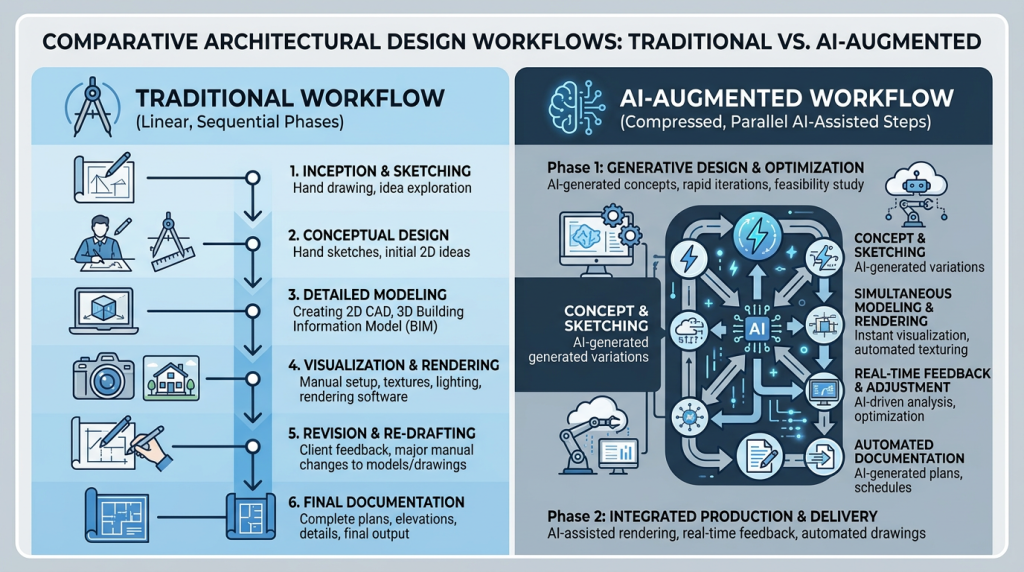
Generative design uses neural networks to produce multiple design alternatives from a defined set of constraints. You specify site boundaries, program requirements, orientation preferences, and budget targets. The architectural AI tool then generates dozens – sometimes hundreds – of massing variations in minutes.
For example, a residential tower project might yield 50 massing options exploring different floor plate shapes, setback strategies, and core locations in under 10 minutes. Architects review, filter, and refine rather than starting from a blank canvas. This shifts creative energy from production to evaluation and judgment.
Neural rendering has largely replaced the overnight render queue for early-stage visualization. Tools like ArchiVinci and Gendo.ai convert model screenshots, sketches, plans, photos, and rough concepts into photorealistic images within seconds.
The AI infers lighting, materiality, landscaping, and atmospheric conditions from minimal input. You can even generate renders directly from elevation drawings without building a full 3D model first.
This is not intended to replace final presentation renders from physics-based engines like V-Ray or Enscape. It replaces the hours spent setting up a quick visual to test a design direction or share with a client during a meeting. Speed of feedback is the primary value.
AI floor plan generators analyze program requirements, adjacency preferences, circulation logic, and code constraints to propose optimized layouts. Feed in a site boundary and a room schedule, and the architectural AI tool returns multiple compliant plan options ranked by efficiency metrics.
Platforms like Maket.ai focus specifically on residential layouts. ArchiVinci focuses on turning floor plans, site plans, sections, model screenshots, sketches, and photos into presentation-ready visuals. The output is a design visualization you refine and present, not a finished construction document.
Large language models (LLMs) now serve as the interface layer for many architectural AI tools. Instead of navigating complex menus, you type a prompt: “Generate a two-story courtyard house with exposed timber framing and a green roof, suited for a Mediterranean climate.”
The AI interprets the natural language instruction and produces concept images, plan diagrams, or even 3D model frameworks. Prompt quality matters enormously. Experienced users learn to specify proportions, materials, context, and style references for more reliable results.
ML models trained on historical project data can estimate material quantities and construction costs at the schematic design phase. This is not a replacement for a quantity surveyor’s final takeoff.
It is an early-stage sanity check that helps prevent teams from developing a design direction that exceeds the budget.
Some tools also help teams test material directions, finishes, lighting, and style alternatives visually. ArchiVinci, for instance, lets designers update textures, furniture, and design style while keeping the original scene and surface detail as consistent as possible.
This capability is especially valuable for real estate developers who need fast feasibility numbers before committing to full design services.
As an architect, your most expensive resource is design time. An architectural AI tool compresses the concept phase by generating massing studies, facade iterations, and spatial configurations you can evaluate in a single sitting. Instead of spending a week on three options, you can review thirty in an afternoon.
AI-powered rendering lets you test visual directions without setting up a full rendering scene. Early documentation and presentation work benefit too, because tools can turn sketches, model views, plans, and sections into client-ready visual assets. ArchiVinci’s render-focused workflows are designed around exactly this pipeline.
As an interior designer, you can use an architectural AI tool to generate multiple furniture layout options for a client presentation in under five minutes. Material selection algorithms suggest finish palettes based on mood board inputs, budget, and supplier availability.
Features like placing your furniture directly into a room scene let you visualize specific product selections in context before committing to a purchase.
Mood board generation from text prompts is another high-value use case. Describe a design direction in words – “warm Japandi living room with walnut accents and linen textures” – and the AI produces visual references instantly.
ArchiVinci can also move between moodboards and design visuals, helping designers turn colors, materials, and style cues into render concepts more quickly.
Urban planning involves juggling site constraints, zoning regulations, environmental data, and community impact assessments. AI tools like Autodesk Forma analyze solar exposure, wind patterns, and pedestrian flow across entire neighborhoods.
As an urban planner, you can use generative site planning to test density scenarios, street configurations, and open-space ratios before committing to a master plan direction. Presentation-ready outputs like AI-colored site plans help communicate proposals to stakeholders and planning boards clearly.
Real estate agencies need compelling visuals fast. An architectural AI tool lets you generate photorealistic renders of a proposed renovation, a vacant lot’s development potential, or a staged interior – without hiring a visualization studio for every listing.
Development proposals benefit from AI-generated visual studies that communicate feasibility to investors in days, not weeks. ArchiVinci’s real estate and virtual staging workflows are built for this speed, producing client-ready visuals from property photos, empty rooms, basic site inputs, and design briefs.
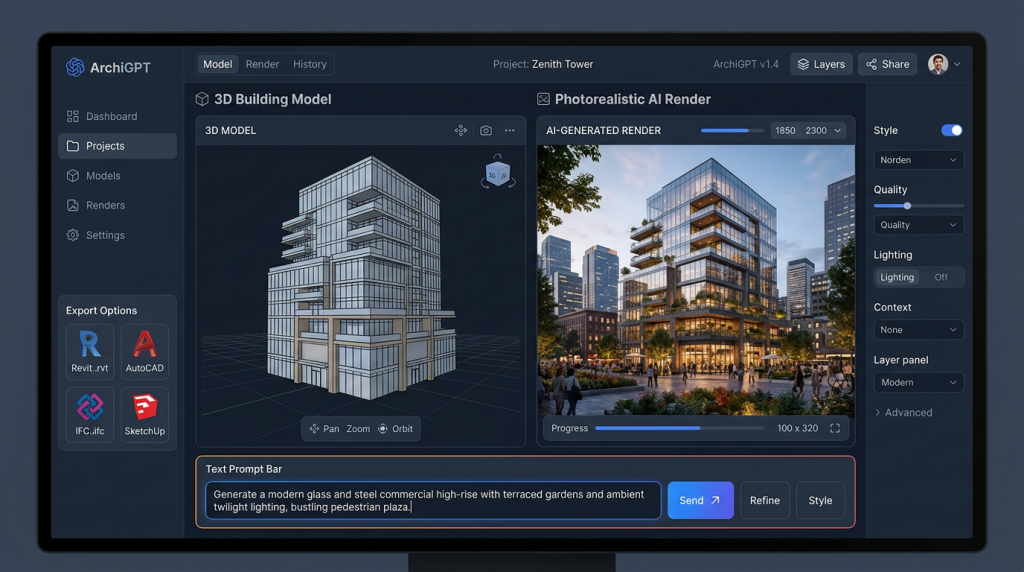
ArchiVinci is an AI render platform built specifically for architecture and design professionals across architecture, interior design, urban planning, real estate, and home design. Unlike general-purpose AI image generators, ArchiVinci is structured around architectural inputs such as sketches, photos, floor plans, model screenshots, and technical drawings.
Its module-based workflow is designed for architectural language and visual fidelity, so prompts about facade materials, interior atmosphere, landscaping, lighting, or presentation style can be applied to real design inputs instead of starting from a blank image.
Key AI Capabilities: AI-powered rendering from sketches, photos, plans, and 3D model screenshots; interior and exterior design visualization; exact rendering for stronger geometry and texture consistency; virtual staging; inpainting; moodboard-to-render workflows; different-angle generation; render enhancement; masterplan and landscape visualization; and image-to-video tools for design presentations.
Best For: Architects, interior designers, landscape architects, real estate teams, students, and design professionals who need a single platform for fast client-ready visualizations across interiors, exteriors, masterplans, floor plans, edits, staging, and presentation assets.
Pricing: ArchiVinci offers free starting access with 3 AI renders and premium plans for higher-volume workflows. Current subscription, one-time, and team options are published on the ArchiVinci pricing page.
- Strengths: Purpose-built for architecture and design visualization; browser-based workflow with no GPU setup; supports sketches, photos, plans, and model screenshots; strong render precision; fast turnaround; and a broad module set for interiors, exteriors, floor plans, masterplans, virtual staging, editing, and video.
- Strengths: Multiple specialized workflows in one place, including Exact Render, Style Transfer, Furnish Room, Modify Room, Modify Architecture, AI Image Editor, Moodboard to Render, Different Angle Generator, Render to 2D Drawing, Image Upscaler, and Image to Video.
- Limitations: ArchiVinci is strongest for concept visualization, rendering, image editing, presentation visuals, and design iteration. Like most AI rendering tools, its outputs should be reviewed by professionals and should not be treated as final construction documentation, code compliance, or native BIM replacement.
Gendo.ai is an architectural AI tool focused on rendering and visualization. Its primary value proposition is turning 3D model viewports – directly from SketchUp, Rhino, or Blender – into styled, atmospheric renders using AI. The workflow is straightforward: export a viewport, choose a style, and receive a render in seconds.
Best For: Architects and visualization specialists who need fast concept renders without leaving their modeling environment. Gendo excels at early-stage mood exploration.
- Strengths: Extremely fast render output; intuitive style-transfer controls; lightweight integration with popular 3D tools.
- Limitations: Focused on rendering only – no floor plan generation, cost estimation, or documentation features. Limited BIM export capabilities.
Midjourney and Stable Diffusion are general-purpose text-to-image AI platforms that architects have adopted for concept visualization. The Midjourney, in particular, produces striking architectural imagery from detailed prompts.
Stable Diffusion offers open-source flexibility with fine-tuned architectural models available from the community.
Best For: Early-stage concept art, client mood boards, and competition imagery where atmosphere and style matter more than dimensional accuracy.
- Strengths: Exceptional image quality; wide style range; large community sharing architectural prompts.
- Limitations: No understanding of building codes, spatial logic, or constructibility. No CAD/BIM integration. Outputs are images only – not editable geometry or plans. Intellectual property ownership varies by platform terms and should be reviewed carefully.
Autodesk Forma is an AI-powered urban design platform that analyzes site conditions – solar access, wind, noise, microclimate – and generates optimized site layouts. Formerly known as Spacemaker, it was acquired by Autodesk and integrated into their cloud ecosystem.
Best For: Urban planners and developers evaluating site feasibility and master plan options. Strong environmental analysis features set it apart from other architectural AI tools.
- Strengths: Deep environmental analysis; native integration with Autodesk ecosystem (Revit, AutoCAD); real-time site optimization.
- Limitations: Custom enterprise pricing can be cost-prohibitive for small firms. Primarily urban-scale – less useful for individual building design or interior work.
Maket.ai focuses on AI floor plan generation for residential projects. Input a site boundary, unit count, and room program, and the platform returns multiple compliant layout options. It targets home builders, residential architects, and developers who need rapid plan iteration.
Best For: Residential architects and home builders who need fast floor plan alternatives. This architectural AI tool handles single-family and multi-family typologies.
- Strengths: Purpose-built for residential floor plans; intuitive interface; fast output.
- Limitations: Limited to residential typologies. No rendering engine. Minimal BIM export options.
Kaedim and Luma AI specialize in 2D-to-3D conversion. Upload a photograph, sketch, or concept image, and the AI generates a 3D mesh. This is useful for creating quick massing models from hand-drawn perspectives or converting reference images into editable 3D geometry.
Best For: Designers who want to bridge the gap between conceptual imagery and 3D modeling without manual reconstruction.
- Strengths: Fast 3D generation from images; useful for early-stage massing; exportable meshes.
- Limitations: Mesh quality is often too rough for detailed architectural work. No BIM awareness. Outputs typically require significant cleanup before use in professional workflows.
Large language models like ChatGPT are not design tools in the visual sense, but they have become useful assistants for architectural research and documentation. Use cases include drafting project descriptions, summarizing building codes, generating specification language, and brainstorming design briefs.
Best For: Supplementing design workflows with text-based tasks. ChatGPT works best when paired with a dedicated architectural AI tool that handles the visual and spatial work.
- Strengths: Versatile text generation; code research assistance; available via API for custom integrations.
- Limitations: No visual design capability. Cannot generate renders, plans, or 3D models. Prone to generating inaccurate code references or technical details – always verify LLM outputs against authoritative sources before relying on them.
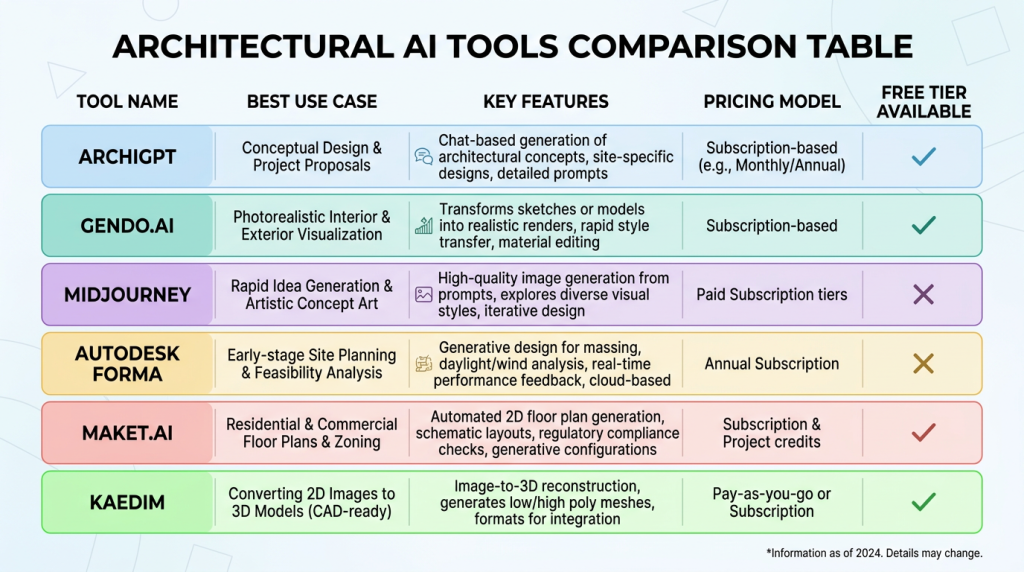
| Tool Name | Best For | Key AI Capabilities | CAD/BIM Integration | Starting Price | Free Tier |
|---|---|---|---|---|---|
| ArchiVinci | Architecture visualization, all-in-one render workflow | AI rendering, interior/exterior, plans, masterplans, staging, inpainting, style transfer, video | Browser-based from sketches, photos, plans, and model screenshots | See pricing | 3 free renders |
| Gendo.ai | Fast concept rendering | AI rendering, style transfer | SketchUp, Rhino, Blender viewport export | From ~$15/mo | Limited free tier |
| Midjourney | Concept art and mood boards | Text-to-image generation | None | From ~$10/mo | No |
| Autodesk Forma | Urban planning and site analysis | Environmental analysis, site optimization | Revit, AutoCAD (Autodesk ecosystem) | Custom pricing | Free trial |
| Maket.ai | Residential floor plans | AI floor plan generation | Limited export (DWG) | From ~$29/mo | Limited free tier |
| Kaedim / Luma AI | 2D-to-3D model conversion | Image-to-mesh generation | OBJ/FBX export (manual import to CAD) | From ~$15/mo | Limited free credits |
Note: Pricing shown is approximate and based on publicly listed rates as of mid-2026. Verify current pricing on each vendor’s website before purchasing.
Most architectural AI tools follow a SaaS subscription model. Free tiers typically limit the number of renders, plan generations, or exports per month. Paid plans generally range from $10 to $50 per month for individual users. Enterprise plans with team collaboration, priority rendering, and custom integrations commonly start above $100 per month.
ArchiVinci lets users start with 3 free AI renders with no watermark, so you can evaluate the platform on a real project before committing. Autodesk Forma uses custom enterprise pricing. Midjourney requires a paid subscription with no free access.
If you need a single platform that covers AI rendering, concept visualization, interior and exterior design, floor plan and site plan visuals, virtual staging, inpainting, moodboards, masterplans, render enhancement, and image-to-video workflows, ArchiVinci is among the most comprehensive options available.
If your only need is fast concept renders, Gendo.ai is a focused alternative. For urban-scale site analysis, Autodesk Forma leads. For residential floor plans specifically, Maket.ai is worth testing.
Midjourney is excellent for inspiration and competition imagery but should not be your primary design tool. ChatGPT complements any architectural AI tool for text-heavy tasks but cannot replace visual design capabilities.
Not all generative outputs are equal. Evaluate whether the architectural AI tool produces results that reflect real spatial logic and building typologies, or just attractive images.
Ask: can you control aspect ratios, structural grids, and programmatic adjacencies? A good tool gives you creative guardrails, not just randomness.
Measure rendering speed in context. A 10-second concept render is transformative for schematic design meetings.
Ask: does the tool maintain material accuracy across lighting conditions? Can you adjust time of day, weather, and camera angle without regenerating from scratch?
For most professional practices, this is non-negotiable. An architectural AI tool that cannot plug into your BIM ecosystem creates more friction than it eliminates.
Ask: does the tool work with your existing design workflow? Can you use inputs from Revit, AutoCAD, SketchUp, ArchiCAD, or other modeling tools through screenshots, exported views, plans, sections, or images? ArchiVinci is browser-based and works from common visual inputs, so teams can use it alongside their existing CAD and BIM tools without complex setup.
For outputs that feed into construction documentation, dimensional accuracy matters.
Ask: are floor plans generated to scale? Can exports preserve layer structure and annotation? Most AI tools are not yet accurate enough for final construction documents, but the strongest platforms produce geometry that requires minimal cleanup.
If you work in a team, evaluate shared project libraries, prompt histories, role-based access, and version tracking. Solo practitioners may not need these features, but for firms with five or more users, collaboration tools prevent duplication and maintain design consistency.
This is an underaddressed concern in most architectural AI tool comparisons.
Ask: does the platform use your uploaded designs to train its models? Who owns the outputs? Is your project data encrypted and stored in compliance with your jurisdiction’s privacy laws? Review ArchiVinci’s privacy and IP information to confirm that your designs remain protected. Every tool you evaluate should answer these questions clearly in their terms of service.
- Does the generative output reflect real building logic and spatial relationships?
- Can it render from your existing 3D models or sketches in under 30 seconds?
- Does it export to IFC, RVT, DWG, or SKP?
- Are floor plan outputs dimensionally accurate and to scale?
- Does the platform support team collaboration with shared libraries?
- Is your design data protected, and do you retain full IP ownership?
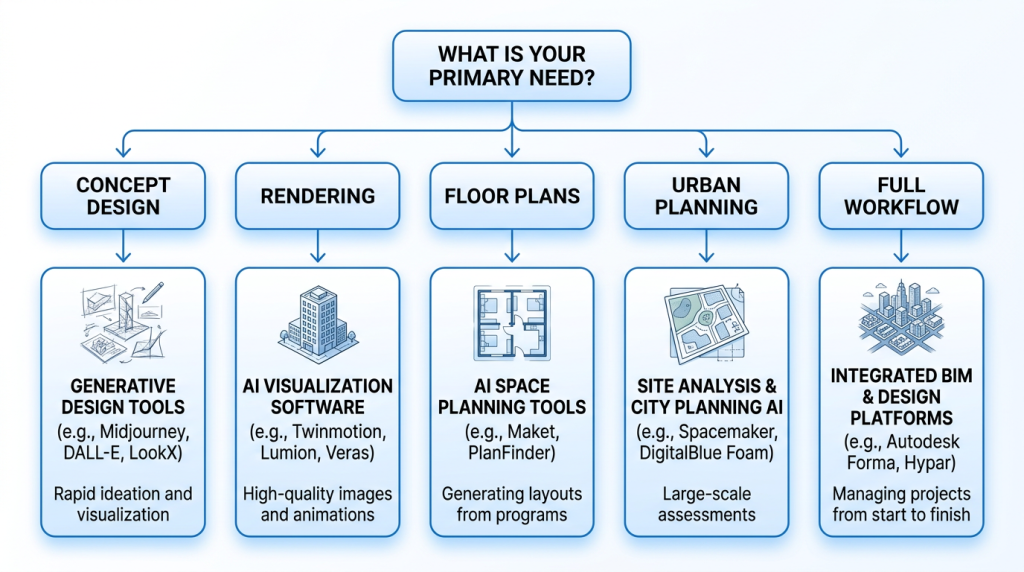
Start by identifying where your firm spends the most unproductive hours. Is it generating initial concept options? Producing client-ready renders? Iterating floor plans? Or drafting preliminary documentation? The answer determines which architectural AI tool category you need.
If your pain point spans multiple visual stages, prioritize a full-workflow platform like ArchiVinci over a point solution. Stitching together three separate tools creates integration overhead that can erode time savings.
Request sample outputs relevant to your building typology. An architectural AI tool that generates strong residential renders may produce less reliable results for commercial or institutional projects. Test whether the AI understands your design vocabulary and produces results that require minimal post-processing.
Before committing, confirm that the tool connects to your specific software versions. Ask for documentation on Revit, AutoCAD, SketchUp, or ArchiCAD plugin compatibility. Test the export pipeline – import an AI-generated floor plan into your BIM model and verify that geometry, layers, and dimensions transfer cleanly.
Solo practitioners need different pricing models than 50-person studios. Calculate cost per user per month, but also cost per output. Some tools charge by render or generation, which can spike costs on busy projects. Enterprise plans often include volume discounts and dedicated support that justify the premium for larger teams.
Never choose an architectural AI tool based on demo videos alone. Take a current project – even a small one – and run it through the tool’s full pipeline. Evaluate output quality, integration smoothness, and time saved against your existing process.
ArchiVinci lets you start with free AI renders for exactly this purpose. Test it on a real brief, with your real sketches, plans, photos, or model screenshots, before making a purchasing decision. Start rendering with ArchiVinci here.
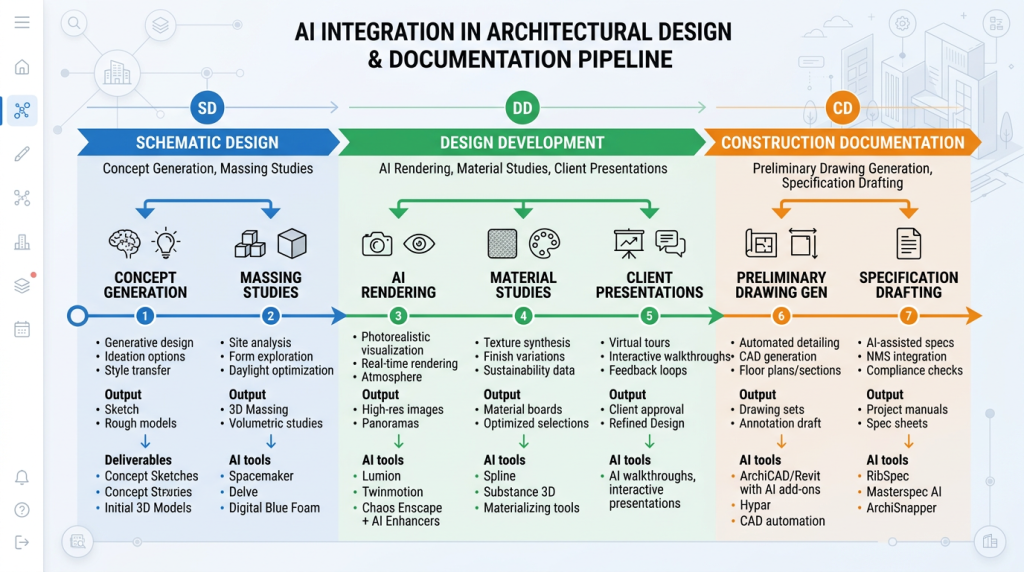
An architectural AI tool delivers different value at different project phases. During schematic design, use generative tools for massing and concept exploration. In design development, leverage AI rendering for client presentations and material studies.
During construction documentation, AI can assist with preliminary drawing generation and specification drafting.
The mistake many firms make is trying to apply AI everywhere at once. Start with one phase where the time savings are most obvious, build confidence, then expand.
The connection method depends on your tool and software combination. ArchiVinci works as a browser-based rendering platform: export a view, screenshot, plan, sketch, section, or photo from your design workflow, upload it to the relevant module, generate a render or visual variation, and use the result for presentations, reviews, and client alignment.
For AutoCAD and ArchiCAD, DWG and IFC exports are the standard pathways. Ensure your architectural AI tool preserves layer naming conventions and coordinate origins to minimize cleanup time after import.
BIM interoperability is where many AI tools fall short. IFC (Industry Foundation Classes) is the open standard for BIM data exchange, maintained by buildingSMART International.
If your architectural AI tool generates floor plans or 3D geometry, verify that it can export valid IFC files with correct object classification – walls as walls, doors as doors, not generic meshes.
For BIM-centric offices, treat ArchiVinci outputs as visualization and design-communication assets rather than native BIM objects. Use them to test style, material, lighting, staging, and presentation directions before refining the approved direction inside your main CAD or BIM environment.
Expect a learning curve. Prompt writing is a skill that improves with practice. Allocate two to four weeks for your team to experiment with the tool on non-critical tasks before deploying it on live projects. Create a shared prompt library of tested inputs that produce reliable outputs for your common project types.
Designate one team member as the AI workflow lead. Their role is to develop best practices, troubleshoot integration issues, and train colleagues.
- Trying to replace your entire rendering pipeline on day one instead of starting with concept-phase exploration.
- Expecting construction-document accuracy from tools designed for schematic-level output.
- Ignoring file format and coordinate system compatibility before importing AI outputs into BIM.
- Failing to establish an internal prompt library, leading to inconsistent results across team members.
- Skipping IP and data privacy reviews before uploading confidential project files.
Avoid these by following a phased adoption plan. Start narrow, measure results, and expand deliberately.
Both platforms support fast AI visualization from design inputs. Gendo.ai excels at speed and simplicity for quick style-transfer renders. ArchiVinci adds a broader architecture-focused toolkit, including interior and exterior rendering, floor plan and site plan visuals, masterplans, virtual staging, inpainting, style transfer, render enhancement, different angles, and image-to-video workflows.
On workflow, ArchiVinci is browser-based and works with sketches, photos, plans, sections, and model screenshots, making it easy to use alongside tools like SketchUp, Revit, AutoCAD, ArchiCAD, and Rhino through exported visual inputs. If rendering is your only need, Gendo is competitive. If you need a broader architectural AI platform for design visualization, ArchiVinci is the stronger choice.
ArchiVinci vs Midjourney for Architectural Visualization
Midjourney produces stunning, artistic architectural imagery. Its strength is pure visual quality and stylistic range. However, Midjourney has no spatial awareness – it does not understand floor plans, building codes, or construction logic. Outputs are flat images with no editable geometry.
ArchiVinci generates visuals from architectural inputs such as sketches, photos, plans, and model screenshots, with workflows designed to preserve geometry, materials, and design intent more closely. For competition boards and mood references, Midjourney is powerful. For design work that starts from your actual project input and needs client-ready architectural visualization, ArchiVinci is the practical choice.
Autodesk Forma is the specialist for environmental site analysis – wind, solar, noise, and microclimate modeling. ArchiVinci’s urban and masterplan workflows focus on turning site plans, masterplans, landscape concepts, and urban design inputs into clear, presentation-ready visuals.
If your primary need is environmental performance analysis, Forma offers greater depth in that specific area. If you need fast AI visualization for planning proposals, site plans, masterplans, landscapes, and development presentations, ArchiVinci offers broader visual utility. Many urban planners can use both tools at different project stages.
Three factors drive adoption. First, workflow consolidation – teams can handle interior renders, exterior renders, floor plan visuals, masterplans, virtual staging, inpainting, style transfer, enhancement, and video in one platform. Second, accessibility – ArchiVinci runs in the browser, so users do not need complex rendering setup or high-end local GPU hardware.
Third, measurable time savings. Based on early adopter feedback, firms report significant reductions in initial rendering time and faster revision cycles when using AI-generated options. Individual results depend on project type, team size, and existing workflow efficiency. We encourage practitioners to benchmark their own results during a trial period.
Ready to test it yourself? Start with ArchiVinci’s free renders and run a real project through the platform before committing.
The most immediate ROI from an architectural AI tool is time. Based on practitioner feedback and industry reporting, firms using AI rendering commonly report significant reductions in initial rendering time – often cutting concept-phase rendering from hours to minutes.
Over a month of active projects, those savings compound into meaningful recovered capacity. Research from McKinsey’s construction and building materials practice supports the broader case that technology adoption in AEC drives measurable productivity improvements.
When you can show clients 10 options instead of two, they tend to make decisions faster. AI-generated alternatives reduce the back-and-forth revision cycle that consumes unbillable time.
Many firms report that client approval cycles shorten noticeably when AI visuals are introduced in early meetings, though the exact improvement varies by project type and client.
In many cases, yes – and in some ways, the impact is greater for small practices. Small studios often cannot afford a dedicated visualization specialist. An architectural AI tool gives a three-person firm rendering and concept output that previously required outsourcing.
At $30 to $50 per month, the tool pays for itself if it saves even two hours of work – typically well below one billable hour at professional rates in most markets.
Use this formula as a starting point. If your team spends 20 hours per week on rendering and visualization, and an architectural AI tool reduces that by even 40%, you recover 8 hours weekly.
At a billing rate of $100 per hour, that represents $800 per week – or roughly $3,200 per month in recovered capacity. Against a $50 monthly subscription, the tool delivers a strong return.
Even conservative estimates – a 25% time reduction on 10 weekly hours at a $75 rate – yield approximately $750 per month in recovered capacity. The math works at virtually every firm size and billing rate. We recommend tracking your own before-and-after metrics during a trial period to calculate ROI specific to your practice.
An architectural AI tool is software that uses generative AI, machine learning, and computer vision to help design professionals with tasks like concept generation, rendering, floor plan optimization, material selection, and construction documentation. It automates labor-intensive processes and accelerates design iteration across every project phase.
No. AI accelerates specific tasks like rendering, layout generation, and cost estimation, but it cannot replace the judgment, creativity, client relationship management, and regulatory knowledge that architects provide. Think of AI as a power tool, not a replacement. The architect remains the decision-maker.
The best tool depends on your specific workflow needs. ArchiVinci is among the most comprehensive options for design professionals who need AI rendering, concept visualization, interior and exterior design, floor plan and site plan visuals, masterplans, virtual staging, inpainting, moodboards, render enhancement, and image-to-video tools in a single platform. For rendering-only needs, Gendo.ai is a strong focused alternative. For urban site analysis, Autodesk Forma leads.
Several platforms offer free tiers or trials. ArchiVinci provides 3 free AI renders with no watermark. Gendo.ai and Maket.ai have limited free tiers. Stable Diffusion is open-source and free to run locally. Midjourney requires a paid subscription with no free option.
Some do. ArchiVinci works alongside Revit, AutoCAD, SketchUp, ArchiCAD, Rhino, and similar tools by using exported views, screenshots, sketches, plans, sections, photos, or model images as inputs for AI rendering and visualization. Autodesk Forma integrates natively within the Autodesk ecosystem. Many other AI tools require manual file export and import rather than direct plugin connections.
Yes, depending on the tool. Maket.ai focuses on generating floor plan options from site boundaries and room programs. ArchiVinci can turn floor plans, site plans, sections, and technical drawings into presentation-ready visuals, colored layouts, furnished floor plan views, and client-friendly render concepts. AI-generated outputs serve as editable design and presentation starting points, not finished construction documents.
Individual plans typically range from low-cost monthly subscriptions to higher-volume premium or team plans. ArchiVinci offers free starting access and premium plans with unlimited ArchiVinci renders, while Autodesk Forma uses custom enterprise pricing. Check each vendor’s pricing page for current rates.
ArchiVinci is an all-in-one AI render platform built for architects, interior designers, urban planners, real estate agencies, students, and design professionals. It turns sketches, photos, floor plans, site plans, model screenshots, and technical drawings into photorealistic renders, presentation visuals, edited design concepts, staged interiors, masterplan visuals, and short design videos. Learn more on the ArchiVinci website.
Start by identifying one project phase where AI adds the most value – typically schematic design or early visualization. Connect the tool to your CAD/BIM software via plugins or file export. Train your team on prompt writing over two to four weeks, then expand usage to additional phases as confidence grows.